Totara Learn Open Discussions

Hide until

 
Carla Bradley
Hide until
بواسطة Thursday, 20 August 2020, 7:16 AM - Carla Bradley
 

Our clients have requested that for one of our courses, we hide the grades until they are "released." It appears that Totara (Version 11) can do this, because there is an option under Gradebook setup==>Course grade settings that is called "hide only until." However, when i go to the settings on the gradebook item, I only see what's below:
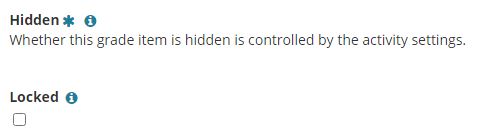


Then, when I go to the activity settings on the quiz, I don't see ANYTHING there that controls if the grade is hidden. Any clues about what I'm missing?

Craig Eves
Re: Hide until
بواسطة Thursday, 20 August 2020, 3:03 PM - Craig Eves (Totara Support)
 

Hi Carla

I tried selecting in the gradebook the Course grade settings of Show grades to 'Hide' and Show hidden items to 'Only hidden until,

I couldn't see anywhere to add a date for how long to hide this though 

When I logged in as a learner with a grade and went to the gradebook I was able to see grade.

Not sure of what else I need to do maybe it only works when using grade category but can't see why this would have an effect.

Regards 


Carla Bradley
Re: Hide until
بواسطة Tuesday, 15 September 2020, 6:06 AM - Carla Bradley
 
Hi Craig -- I'd like to simplify my question, and not worry about the "hide until" part.


In the screenshot above, you can see where it says whether the grade is hidden is controlled by activity settings, but I can't find the setting there, either. Can you advise? Obviously the quiz settings are bit much to screenshot, but if you need to see a specific area I can send.