Can anyone tell me if there is a way to run a report that only shows the number of enrollments and completions without listing all the users?
Totara Learn Open Discussions
Enrollment numbers in Report
Enrollment numbers in Report
Re: Enrollment numbers in Report
Hi Jennifer
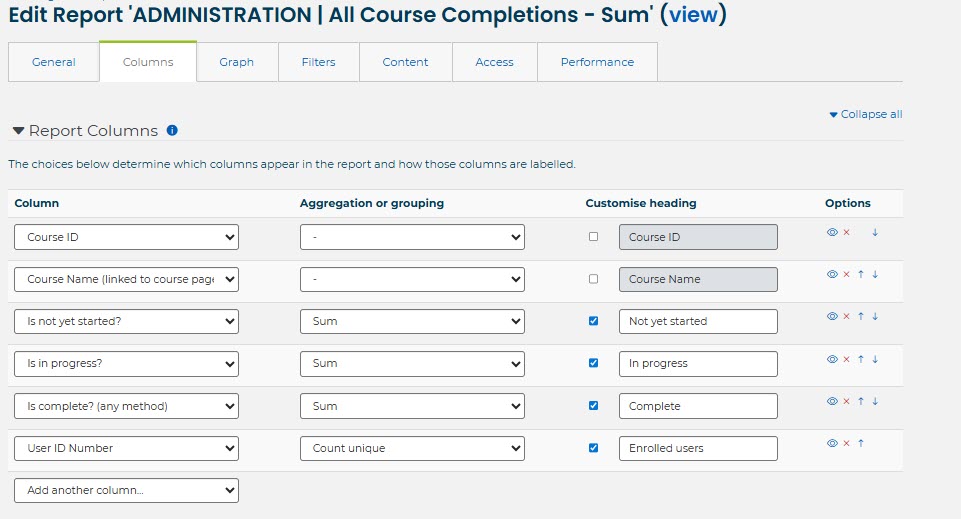
If you use the course completion report source, then add the columns 'Is in progress?', 'Is not started?' etc (or just Is complete/Is not complete) you can use the aggregation / grouping column and choose Sum. There are more options than usual for the Is/Is not columns (but I'm not sure why).
Then add a column that is unique to the user and choose Count unique (although should already be unique). For the course completion report source, only enrolled users show on the report so all users on the report are enrolled users.
Jane
Re: Enrollment numbers in Report
Thank you so much!
Re: Enrollment numbers in Report
A tip you might want to also consider: include a filter in the report to weed out any users who have been unenrolled. The filter is 'Is enrolled'
Whenever you enrol a user into a course it automatically creates a completion record. The course completion report source will provide all users that have a completion record for that course.
So when you run the report the numbers you see will include both enrolled users and people who are no longer enrolled.
If you use the filter it will provide the numbers for the enrolled users.
However I don't know without testing whether the filter will filter out suspended enrolments.
(Enrolments can be suspended via Participants > Edit enrolment (gear icon) > Status: Suspended OR via Course > Users > Enrolled users, select users, and under "With selected users..." choose "Edit user enrolments" to change status to Suspended.)