Totara Learn Open Discussions

Extra info after adding SCORM

 
Paula Americo
Extra info after adding SCORM
بواسطة Thursday, 24 March 2022, 7:56 AM - Paula Americo
 

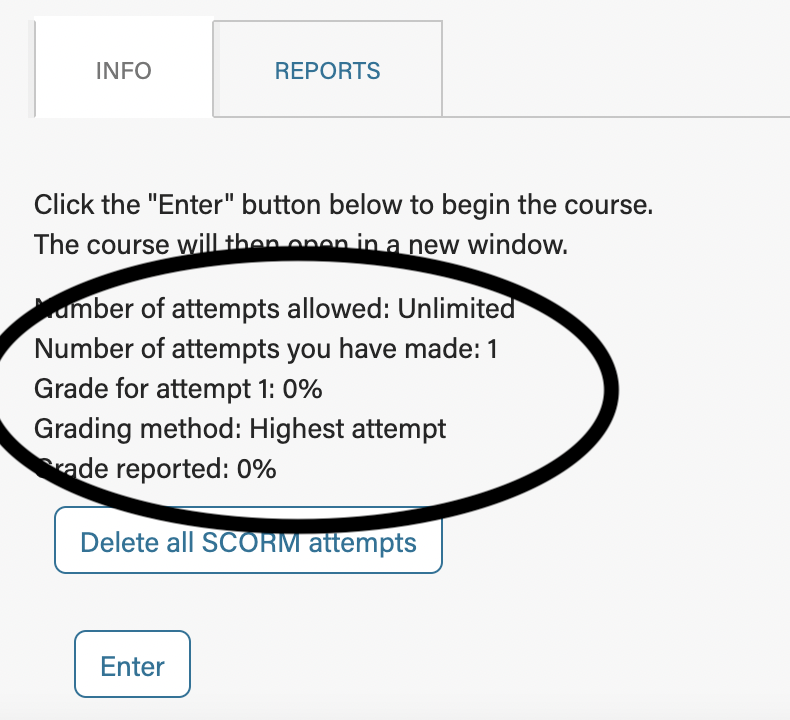
Good morning! When our team uploads a SCORM package, the user sees extraneous information that they don't need. Is there a way to remove the circled wording (see screenshot)? Thank you!!

Jon Evans
Re: Extra info after adding SCORM
بواسطة Friday, 25 March 2022, 2:41 AM - Jon Evans
مجموعة Partners

Hi Paul

You can one of two things in the SCORM activity settings (/admin/settings.php?section=modsettingscorm), or in the Appearance section at the activity level

  1. Set 'Learner skip content structure page' to Yes. This will bypass this page entirely and launch the Scorm

  2. Configure the following settings - they control the display of the various text elements on the entry page:
    Display course structure on entry page: No
    Display attempt status: No
    Disable preview mode: Yes (note that this may not be desirable if you are using preview in your workflow)


Paula Americo
Re: Extra info after adding SCORM
بواسطة Friday, 25 March 2022, 5:21 AM - Paula Americo
 

Thank you, this helped!