Totara Learn Open Discussions

Modify new discussion email notification template

 
Phil Everist
Modify new discussion email notification template
door Phil Everist - Wednesday, 10 July 2024, 23:21 PM
 

How can you modify what is sent by email when someone posts to an engage workspace

Two examples

  1. increase the number of lines of text extracted from the post to include in the email (to provide more context for the recipient to choose to read the full post online)

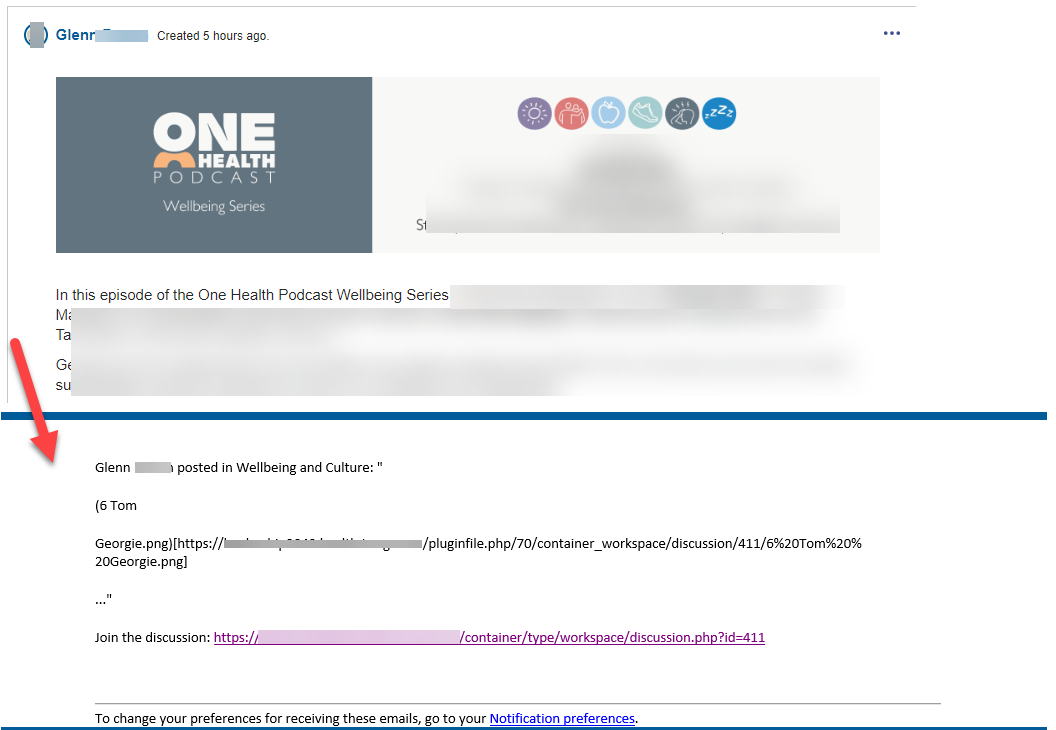
  2. Ignore any image files such as a branding banner at the top of the post (which just displays as text file name and location taking up all the content sent) - we have some podcast posts nicely styled with a banner image at the top followed by the key intro text but the email notification just displays the image filename and location (irrelevant in this context) and not the critical intro text immediately after the banner image (see attached screen shot of post and email


Craig Eves
Re: Modify new discussion email notification template
door Craig Eves (Totara Support) - Thursday, 11 July 2024, 16:55 PM
 

Hi Phil

The message can be modified by changing the string in the language pack as this is not a notifiction that has been created with centralised notifications. The string below is the one that controls this - the placeholders need to be kept in the format shown.

Regards

Phil Everist
Re: Modify new discussion email notification template
door Phil Everist - Tuesday, 16 July 2024, 22:45 PM
 

Thanks Craig

It looks like there is a truncation limit of 25 charters of the workspace post in the {$a->discussion} string that gets included in the 'new discussion' email.

Is that truncation limit a system setting that can be adjusted?

Thanks

Phil

Marion Wrana
Re: Modify new discussion email notification template
door Marion Wrana - Tuesday, 25 November 2025, 03:50 AM
 

Hi there, we are currently also looking at this issue.

@Craig - Are there more details available on truncation limits? I have not been able to find any documentation on this nor has our partner.

We currently only have insights based on our previous experience. Here’s what we’ve been able to piece together so far from observing how the preview behaves:

The preview allows a maximum of 140 characters including spaces and can only display them across two lines. If the 140 characters are not fully used within the first two lines of the post, the following characters from the third line are also included. However, the line break is then shown as \n\n.

If adding the next word would exceed the 140-character limit, that word will not be displayed in the preview.

Formatting such as bold or italics is not applied in the preview.

Heading formatting is carried over into the preview. The heading we used most recently had 83 characters including spaces. It seems likely that only around 60–80 characters (including spaces) can be displayed as a heading on the first line. If the heading is longer, the remainder appears in the next line of the preview, but without formatting.

Thanks!