Totara Learn Open Discussions

Formatting of reports when exporting to Excel

 
Alistair Cockroft
Formatting of reports when exporting to Excel
par Alistair Cockroft, Wednesday 9 July 2025, 07:21
 

Apologies if there is already a post on this (I did search but just got a long list of release notes).

When exporting a report to Excel I see no option to format the look and feel of the report or to apply sorting to the results. This means we can't send directly to users as they would have to format the report themselves which is inappropriate when they're senior managers or busy clinicians.

Am I missing a trick or a plugin that allows me to set the formatting before the report is exported/emailed?

Any help gratefully received!
Craig Eves
Re: Formatting of reports when exporting to Excel
par Craig Eves (Totara Support), Thursday 10 July 2025, 20:37
 

Hi Alistair

The columns and data in reports are converted to Excel with plain text - even converting with plain output takes a lot of processing time.

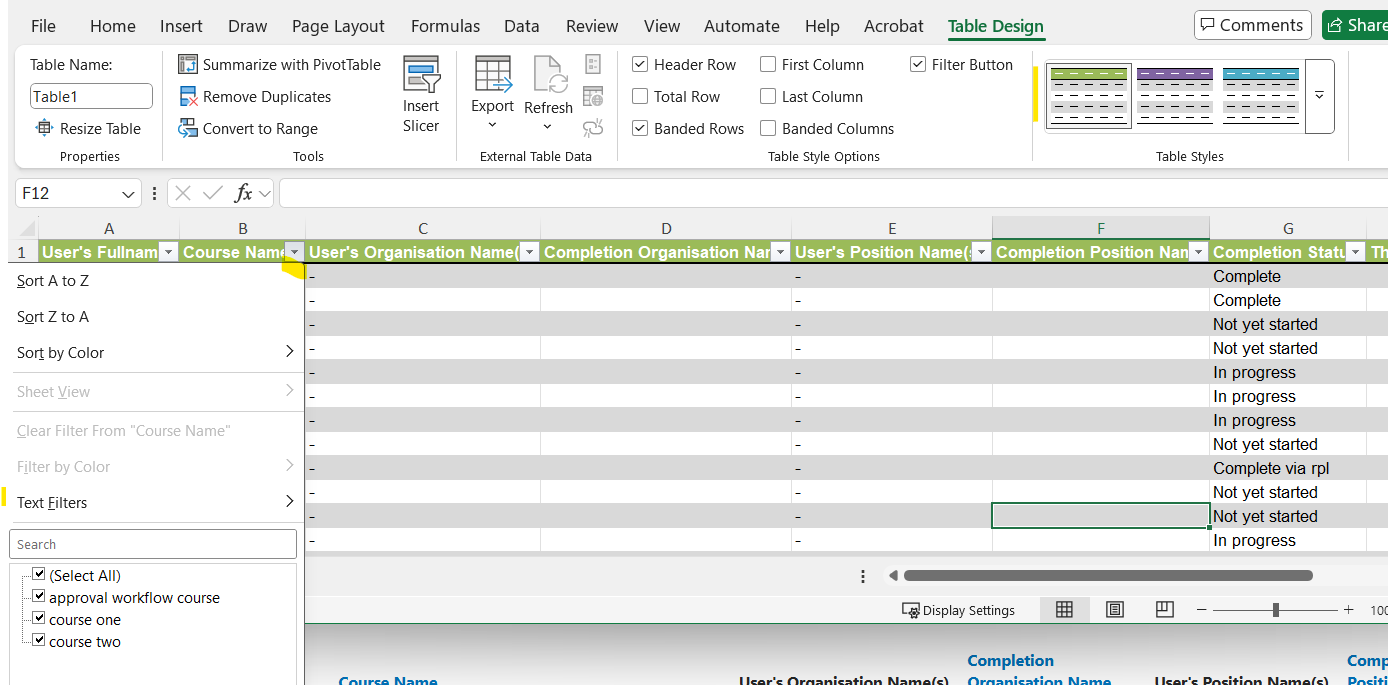
Once the file ihas been exported in Excel it is possible to select a one click Table style that formats the Header row and allows the data to be filtered and sorted

Regards