Totara Learn Open Discussions

Updating a SCORM file used as a source for alias/shortcuts

 
Doug Roberts
Updating a SCORM file used as a source for alias/shortcuts
di Doug Roberts - Tuesday, 20 August 2024, 02:48
 

Hello all,

I'm trying to replicate a workflow I used at a previous organisation, also on Totara, but I'm unsure of exact versions and/or possible plugin differences and am getting stuck.

The goal was to have a single place to update multiple SCORM files that were added as aliases to courses.

I believe we simply created a course and added all SCORM activities to it, then added those files as aliases to the relevant courses.

However, I do not remember the process for updating these SCORM files.

When I try to replicate this scenario, I cannot see a way to update the source file -- only delete it and upload a new one. But this breaks the link to the courses that use the alias -- as the LMS warns me, alias files are converted to copies.

As I'm going completely off memory, I may be mistaken in the details of exactly how this was set up. But the effect was the same -- a central course containing all SCORM files and aliases in each individual course.

I would be very grateful if anyone has any suggestions to get me on track.
Craig Eves
Re: Updating a SCORM file used as a source for alias/shortcuts
di Craig Eves (Totara Support) - Tuesday, 20 August 2024, 19:02
 

Hi Doug

There is some information on the auto-update of a SCORM using an alias that may help on

https://totara.help/docs/en/update-a-scorm-activity

regards


Doug Roberts
Re: Updating a SCORM file used as a source for alias/shortcuts
di Doug Roberts - Wednesday, 21 August 2024, 01:02
 

Hi Craig,

Thank you for the link. I had read it previously.

That link details creating an alias from a SCORM file, but not how to update the SCORM file you created the alias from.

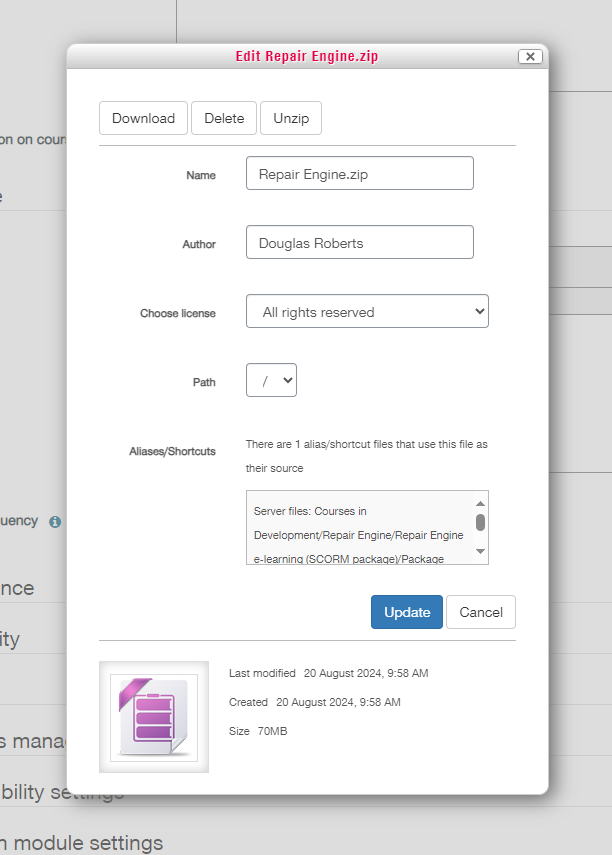
In the options for the source file, there is an 'Update' button, but that seems to only update metadata, not the file itself. Deleting and replacing the file breaks the link to existing aliases.

Craig Eves
Re: Updating a SCORM file used as a source for alias/shortcuts
di Craig Eves (Totara Support) - Tuesday, 3 September 2024, 18:33
 

Hi Doug

Once the SCORM is stored on an external repository using an alias then there should be an auto update frequency setting for the package that can be set to every day

Regards

Doug Roberts
Re: Updating a SCORM file used as a source for alias/shortcuts
di Doug Roberts - Wednesday, 4 September 2024, 00:49
 

Hi Craig,

Yes I understand that. My question is: given the setup I posted above, how do I update the original SCORM that the alias was created from? As I said above, in the options for the source file, there is an 'Update' button, but that seems to only update metadata, not the file itself. Deleting and replacing the file breaks the link to existing aliases.

Peter Grennan
Re: Updating a SCORM file used as a source for alias/shortcuts
di Peter Grennan - Monday, 2 February 2026, 03:47
 

Hi Doug, sorry to resurrect something from so long ago - did you ever figure this out? I'm just trying to figure out if aliases would work for us as we have multiple pathway courses that use the same SCORMS, so it would be good to only need to update the "base" file so all aliases update. But if changing the source file breaks the link to the other courses then this won't be very useful.

Doug Roberts
Re: Updating a SCORM file used as a source for alias/shortcuts
di Doug Roberts - Monday, 2 February 2026, 04:46
 

Hi Peter, no I'm afraid not. I concluded that we had a plugin that enabled the use of aliases in this way at my previous organisation, but I don't know what that was.

Peter Grennan
Re: Updating a SCORM file used as a source for alias/shortcuts
di Peter Grennan - Monday, 2 February 2026, 05:21
 

Thanks for the reply Doug. Seems odd that it behaves that way as it seems to go against the point of aliasing in the first place. I'll keep researching to see if there's a solution. Thanks again!

Stephen Catton
Re: Updating a SCORM file used as a source for alias/shortcuts
di Stephen Catton - Tuesday, 3 February 2026, 00:42
 

Hi Peter.

We do this a lot. I have a Course called Do No Ever Delete. I use organised Folders to store the SCORM files in.

You can update just by uploading the new version and overwriting the current one. This means the file names need to be exactly the same. The Aliased SCORM Activities are automatically updated.

Don't forget to set the update frequency in the SCORM activity that has the alias in it.

I hope that helps or I have misunderstood your question.

Cheers

Stephen

Peter Grennan
Re: Updating a SCORM file used as a source for alias/shortcuts
di Peter Grennan - Tuesday, 3 February 2026, 04:52
 

Thanks Stephen. That sounds hopeful. Sorry for what may be a daft question - my team primarily designs the eLearning and we have fairly high-level access with the LMS so we can administer and update our courses, but we don't have access to everything. So, I have a test pathway course that I'd hope to have all the SCORMS in. But I'm confused about what you mean by organising folders. In my test course, I've uploaded all the pathway sections and uploaded a SCORM to each section. These sections will be repeated in multiple courses but in different orders and different numbers of the sections appearing depending on the course. I think when I tried it before I had the same problem as the previous poster, that updating the SCORM in each section of the test pathway broke the link in some way. How are you creating folders in a course? I don't believe I have that capacity. Would there be a permission I'd have to ask to have updated? Thanks again for the reply and in advance of any further advice you can offer.

Stephen Catton
Re: Updating a SCORM file used as a source for alias/shortcuts
di Stephen Catton - Wednesday, 4 February 2026, 01:28
 

Hi Peter

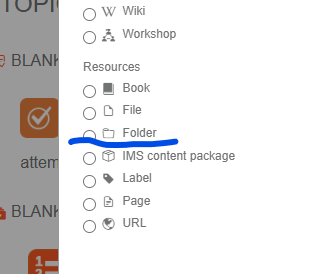
A Folder is a Resource in our course.

If you can't see it, it needs to be enabled in the Manage Plugins section.

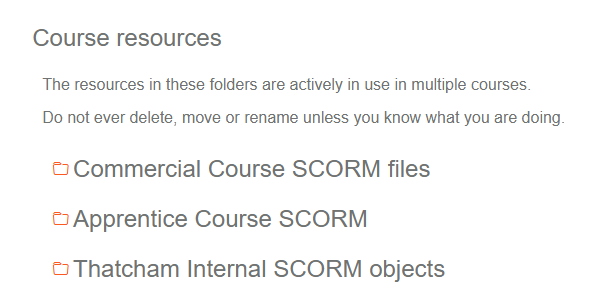
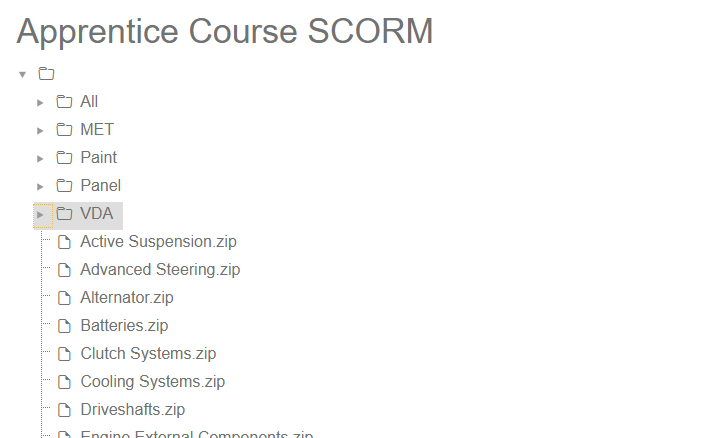
They are displayed in a course like this.

We organise them like Windows folders. You cannot move or rename them or the SCORMs once the SCORMS have been aliased to. If you do it by accident, all of the aliased SCORMs will be made into copies, so it won't destroy the course it is in. You can reconnect them afterwards. (Been there and done that. 😁 )

They can then be searched for from the SCORM activity you want to add them to.

We also have instructor-led face-to-face courses, both on-site and off-site, and I use Folders to hold any files, such as PPTs or Docs, that they might need to deliver the course. The folder would only be visible to the Trainer.

I hope that helps. Please let me know if i can be of any help

Cheers

Stephen

Peter Grennan
Re: Updating a SCORM file used as a source for alias/shortcuts
di Peter Grennan - Friday, 6 February 2026, 01:16
 

Thanks Stephen, that's really clear. I think I've concluded from searching around that folders aren't available in pathway courses. But I can't see any reason why I can't just set up a non-pathway with the requisite folders and files and still point to that from my multiple pathway courses. I will have a play. Thanks again for the input!

I like the idea of keeping any live materials in there as well. Nice extra back up (we also deliver some live content too so could be similar).

Pete

Stephen Catton
Re: Updating a SCORM file used as a source for alias/shortcuts
di Stephen Catton - Monday, 9 February 2026, 08:40
 

Hi Peter.

Have fun.

We have the course holding the SCORM and other assets visibility set to No users. This doesn't prevent you from aliasing to the assets, but stops people from finding the course.

Cheers

Stephen